Show summary Hide summary
- Design and comfort: a heavy-duty idea made wearable
- Battery and ports: practical, but proprietary
- Software experience: promising features, uneven polish
- Apps and content: hits, misses, and a standout
- Input friction: virtual keyboards and external accessories
- Tracking, AI assistant, and passthrough camera
- Developer focus and the future of wearable XR
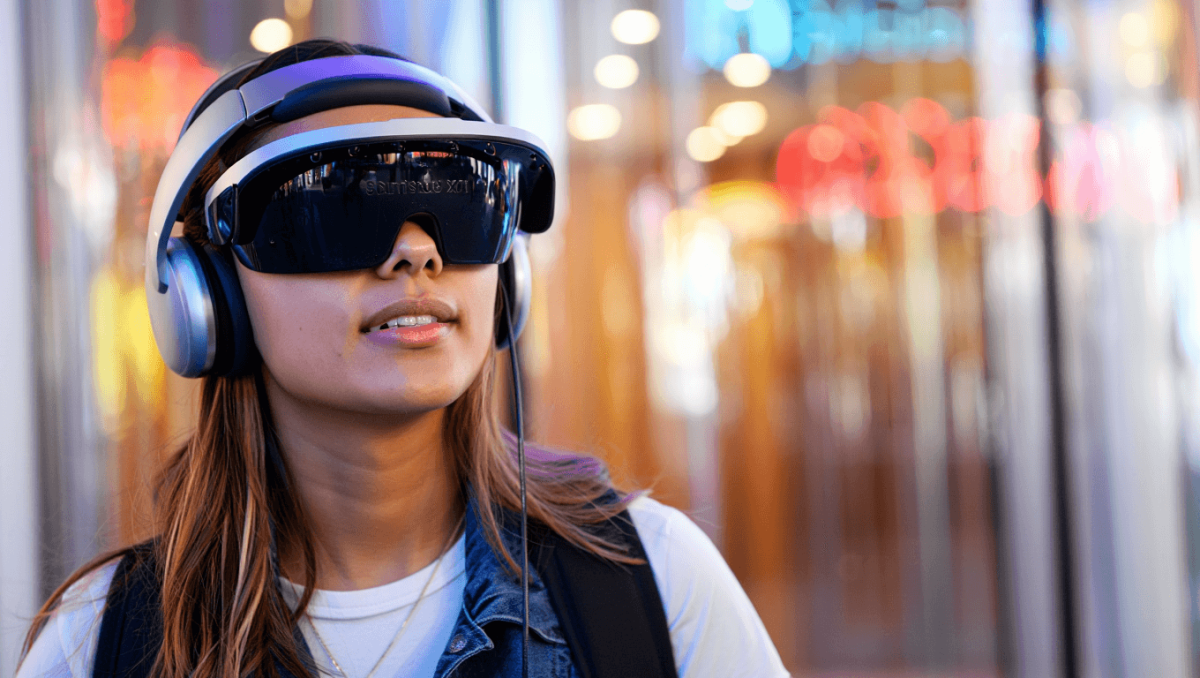
Wearing the Samsung Galaxy XR for the first extended session in Las Vegas made one thing clear: this headset is a bold step forward, but it’s also a device that raises more questions than it answers. Sleek hardware and impressive spatial tricks sit beside inconsistent apps and clumsy inputs. After two weeks of daily use, I kept circling back to one question — who is this truly built for?
Design and comfort: a heavy-duty idea made wearable
Samsung nailed the aesthetic and the basic ergonomics. The headset looks modern and avoids feeling like a brick on your face. Crucially, the company moved the battery out of the head unit and into a pocketable pack. That choice cuts perceived weight and helps during long sessions.
Nas slams music industry over disrespect: teases new music, vows to address it
1992 vocal performances: 3 jaw-dropping moments that still amaze
The strap system is adjustable via a twist knob that secures the fit. It works well for hours of work, but the strap’s placement is fixed. For some hairstyles, the strap sits too high. I wish the rear anchoring point had more adjustability.
Battery life aligns with Samsung’s claim: about two hours under a multitasking load. During that period I had a doc, multiple browser tabs, an email app, and a video stream running. The headset charges via a proprietary USB-C connection to its pack. You can charge while using the headset if your charger is powerful enough.
Battery and ports: practical, but proprietary
- Runtime: roughly 2–3 hours with mixed use.
- Charger compatibility: requires high-wattage chargers to power live use.
- Connector: USB-C style, but proprietary to Samsung’s battery pack.
- Feedback: no visible battery-level pips on the pack.
In short, the battery system is smart and functional, but the locked connector is an annoyance. A universal swappable pack would have been preferable.
Software experience: promising features, uneven polish
On the surface, the Galaxy XR’s AR interface works well. Hand and eye tracking are responsive. Moving and resizing windows is intuitive. Many gestures feel natural after a short learning curve.
But the platform is inconsistent. Quick toggles are cryptic icons. Some apps behave like floating browser windows. Others dive into full 3D immersion without an easy exit. That inconsistency creates friction when switching tasks.
Gestures and controls
The gesture to open multitasking — a thumb-and-finger pinch facing you — becomes easy with practice. Eye tracking speeds interaction, but switching control cleanly between gaze and hand input needs refinement. I frequently had to extend my arm before hand tracking took over.
Launcher and multitasking
The launcher resembles interfaces from other spatial headsets, so it feels familiar. A useful “Tidy up” button arranges windows neatly when clutter builds up. Yet some system apps still steal focus and hide everything else when opened. That behavior breaks workflow.
Apps and content: hits, misses, and a standout
The Galaxy XR accesses the full Play Store, which is both a strength and a problem. Many apps are labeled “Not optimized for XR.” Even some optimized apps remain simple floating rectangles in space.
MLB’s XR app is a rare, compelling example. It uses 3D and spatialized video in ways that feel native to the headset. The experience is immersive, with highlights and interactive elements that show what this platform can do. But it still suffered from bugs on my unit — login fields and passthrough controls failed to respond.
Streaming apps can range from acceptable to washed out. For example, one major service displayed dimmed, flat video with no way to adjust contrast or brightness. That variability will frustrate users who want consistent media playback.
Spatial photos and pinned apps
3D “spatialized” photos are an impressive feature. Photos of a neon-lit strip and a family graduation gained convincing depth and scale. The effect makes conventional photos feel more alive.
Pinning apps to real-world locations mostly worked. I could leave a timer or a media player anchored to a spot in my kitchen and walk to other rooms. In some cases, apps persisted across rooms exactly where I left them. In other cases, app surfaces rendered backwards or revealed their “back” panels when viewed from different angles. Those oddities are quirky rather than deal-breaking.
Input friction: virtual keyboards and external accessories
The built-in virtual keyboard needs serious improvements. Typing on it felt slow and error-prone. I bought a small Bluetooth keyboard to compensate. That helped, but Bluetooth lag popped up occasionally, causing freezes in typing and editing.
Simple tasks like password entry became frustrating when the virtual input failed. In one case, an app’s login field was unresponsive. These issues matter a lot for productivity.
Tracking, AI assistant, and passthrough camera
Eye and hand tracking are among the headset’s strengths. They work well individually. Combined, they require smoother handoff.
Two buttons sit on the top of the headset. One launches Gemini, Google’s conversational assistant. Gemini helps with in-headset actions and guidance. It can turn on immersive modes and offer quick tips. It could not, however, perform every task I tried, like taking screenshots.
The passthrough camera gives you a usable view of the outside world. It’s grainy, similar to competing headsets. You can move around, cook, and navigate your home while wearing the device, but the image noise is noticeable.
Developer focus and the future of wearable XR
After weeks of use, the impression is clear: Galaxy XR feels like a developer-first headset. The hardware and software are a platform invitation more than a polished consumer finish. The core tech shows potential, but the ecosystem needs more apps designed specifically for spatial interaction.
The real prize may be a slimmer future: glasses that deliver similar experiences. Rumors suggest partnerships between Google and XReal that could turn the Galaxy XR’s capabilities into a true glasses form factor via Project Aura. That shift would be the moment XR becomes truly mainstream.
For now, the Galaxy XR is a powerful prototype. It demonstrates important advances while exposing where the industry still needs to improve. If you’re a developer or an early adopter hunting for spatial computing experiments, this headset is worth exploring. If you want a polished daily consumer product, the next wave of glasses may be the better bet.