
Show summary Hide summary
- Price, highlights, and first impressions
- Design and display: a tablet that fits your hand
- Key specifications you should know
- Performance and multitasking: power meets productivity
- Cameras: solid for everyday shots, not for pros
- AI editing tools and Gemini features for creators
- Software, sharing, and cross-platform compatibility
- Battery life and charging in real use
- Who should consider the Z Fold 8 and buying tips
Samsung’s latest foldable tries to blend pocketable convenience with a tablet-sized screen. The Galaxy Z Fold 8 arrives with bold hardware choices, strong performance, and AI tools aimed at creators. But its camera package and steep price could temper some buyers’ excitement.
Price, highlights, and first impressions
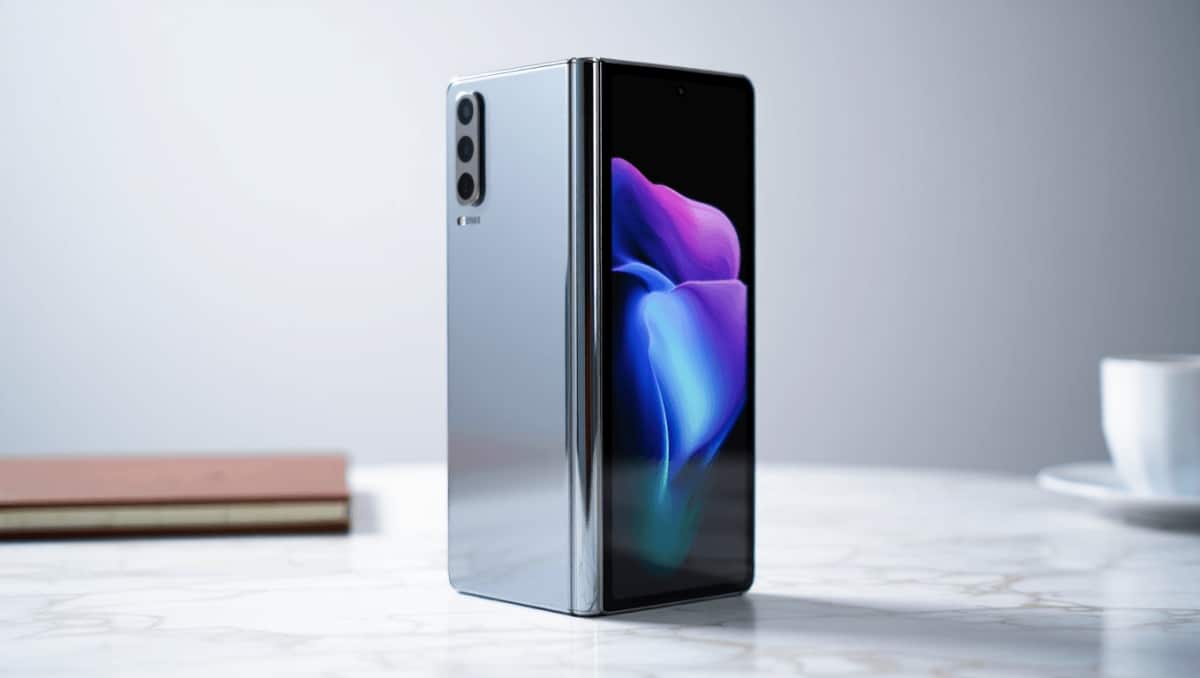
The Z Fold 8 starts at $1,899.99, placing it firmly in the premium category. You get a device that feels like a pocketable tablet when open, yet folds into something you can slide into a pocket.
80s British indie bands that changed American alternative rock forever
Pearl Jam drummer quits after 27 years: band says where things stand
- Standout: Massive inner display for media and multitasking.
- Trade-off: Camera hardware is capable but not class-leading.
- Extras: Gemini-backed AI photo tools and a six-month Google AI Pro subscription.
Design and display: a tablet that fits your hand
Samsung pushed the display size up to a roomy inner panel. The screen transforms reading, streaming, and gaming on a phone-sized device.
Inner display: 7.7-inch AMOLED with 120Hz refresh and extreme peak brightness.
The crease is subtle in daily use thanks to hinge and material improvements. Samsung’s new hinge materials improve durability and feel. The device is slim when unfolded and slips into a pocket more easily than many would expect.
There is a small punch-hole for the selfie cam on the inner screen. It is noticeable, and may be removed in future iterations. The phone does not support a half-open “Flex Mode” for desk use.
Key specifications you should know
- Displays: 7.7-inch inner AMOLED, 5.5-inch outer AMOLED, both up to 120Hz
- Processor: Snapdragon 8 Elite Gen 5 for Galaxy
- Memory: 12GB to 16GB RAM
- Storage: 256GB, 512GB, or 1TB
- Battery: 4,800 mAh
- Charging: 45W wired, 20W wireless
- Cameras: Dual 50MP (wide + ultrawide), 10MP selfie
- Weight: About 201 grams
- Colors: Lavender, cream, graphite, pistachio
Performance and multitasking: power meets productivity
The Snapdragon 8 Elite Gen 5 for Galaxy brings fast real-world performance. Apps load quickly and switching between tasks feels fluid. The chipset also enables on-device AI processing for features like photo edits.
When pushed with 4K recording or heavy workloads, the phone gets warm. It never reached an alarming temperature, but the thin chassis limits heat dissipation.
The wide inner screen excels at multitasking. You can run two or three apps side-by-side, drag floating windows, and resize panes. That flexibility makes split-screen workflows practical.
- Music + reading apps side-by-side work smoothly.
- You can keep a chat window open while browsing or watching videos.
- Some apps still have minor UI quirks when resized.
Cameras: solid for everyday shots, not for pros
Samsung equipped the Fold 8 with two 50MP rear sensors and a 10MP inner selfie cam. The rear shooters take dependable photos, but they do not match the top-tier flagships in sheer imaging power.
Good points: Accurate handling of highlights and shadows. Reliable 2x zoom for everyday framing. Great results for social posts and travel images.
Weaknesses: Selfie quality lags behind the main cameras. Low-light and video may not impress creators used to 200MP sensors or flagship telephoto systems.
- Portraits are usable and often better when taken with the main cameras.
- Digital zoom is serviceable up to 2x and 4x, then noise becomes more noticeable.
- Video recording is stable, but thermals can cause mild throttling during extended sessions.
AI editing tools and Gemini features for creators
One of the Fold 8’s more compelling additions is its built-in AI editing suite. These tools make quick fixes simple and fast on the big screen.
Included: A trial of Google AI Pro and Gemini-driven suggestions. The phone can remove photo bombers, enhance focus, and apply edits from text prompts.
The large inner display makes fine image adjustments easier than on smaller phones. AI edits carry a digital watermark to show when content was altered.
Practical AI features you’ll use
- Text prompts to describe edits.
- One-tap object removal and background adjustments.
- Auto-suggestions for actions across apps, like calendar invites from messages.
Software, sharing, and cross-platform compatibility
The Fold 8 runs Android 17 with One UI 9. Samsung refined how apps scale and how notifications appear across the two screens.
A notable feature is Quick Share to Apple devices. This reduces friction when moving photos and files to nearby Macs and iPhones. It can ease the transition for users who juggle ecosystems.
Daily software behavior is polished, but a few apps still need better multi-screen handling. Expect gradual improvements as developers optimize for foldables.
Battery life and charging in real use
The 4,800 mAh battery provides a full day for most users under mixed usage. Heavy gaming and extended 4K capture shorten that timeframe.
- Wired charging: Up to 45W for quicker top-ups.
- Wireless: 20W capability for cable-free charging.
- Adaptive power management helps in multitasking, but thermals can affect longevity under sustained loads.
Who should consider the Z Fold 8 and buying tips
If you value a large, multitasking screen and like showing off new tech, this phone is attractive. It also suits power users who want on-device AI and a laptop-lite workflow.
Consider alternatives if camera excellence or the absolute best battery life are your priorities. The price is high, but carrier deals and trade-ins can significantly lower the entry cost.
- Good fit: Mobile creatives, multitaskers, and media lovers.
- Less ideal: Users seeking top-tier camera performance or tight budgets.
- Tip: Look for trade-in promotions from carriers to reduce the upfront cost.










