
Show summary Hide summary
- Price and what you get for the money
- Design and portability built for commuting
- Display quality: bright, punchy 2.8K OLED
- Ports and connection layout you’ll want to know
- Audio performance and limitations
- Typing and trackpad experience
- Webcam, Windows Hello, and privacy alerts
- Performance: benchmarks and daily use
- Battery life in practical terms
- Key trade-offs and who this laptop serves best
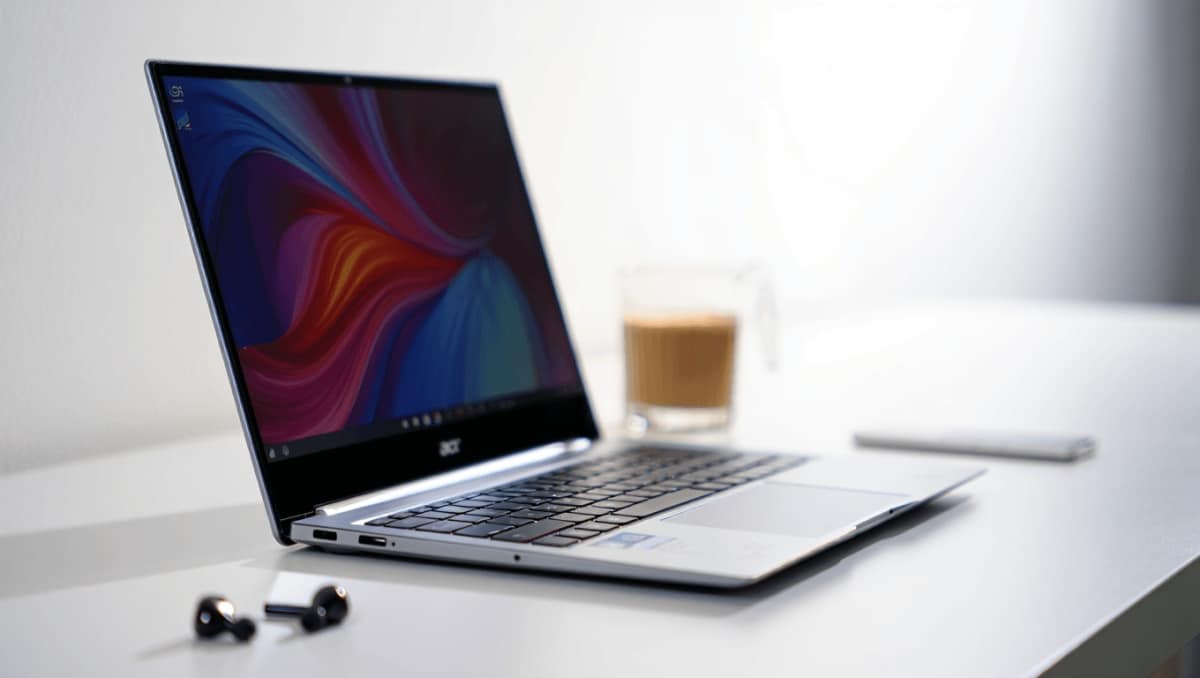
Light, elegant, and unexpectedly capable, the Acer Swift Edge AI 14 surprised me from the first pick-up. Its near-featherweight frame and refined finish make it stand out among travel-ready Windows laptops. Yet its real appeal comes from a rare combination of long battery life, a vivid OLED screen, and a tactile keyboard—features you rarely find together at this price point.
Price and what you get for the money
Acer positions the Swift Edge AI 14 in the mid-range segment. The configuration I tested retails for about $1,499.99, often available on Acer’s store and Amazon. Occasionally it drops to around $1,399.
80s British indie bands that changed American alternative rock forever
Pearl Jam drummer quits after 27 years: band says where things stand
- Processor: Intel Core Ultra 7 258V
- Graphics: Integrated Intel Arc 140V
- Memory: 32GB RAM
- Storage: 1TB SSD
- Screen: 14-inch 2.8K (2880 x 1800) touch display
That spec mix aims to balance portability and productivity for users who want more than the average ultraportable.
Design and portability built for commuting
The Swift Edge AI 14 weighs an almost unbelievable 2.18 pounds and measures roughly 12.35 x 9.03 x 0.65 inches. It feels like a seriously portable machine you’d want on planes and daily commutes.
The chassis is a pearl-white magnesium-aluminum alloy with subtle gold etching and a dual-arrow motif on the lid. The finish resists fingerprints well. Even after deliberate smudging, the lid still looked clean.
Despite the lightweight construction, the keyboard deck felt solid and hinge stiffness was reassuring. The lid does flex more than a thicker, clamshell design, but that’s a trade-off for the thin profile.
Display quality: bright, punchy 2.8K OLED
The 14-inch 2.8K OLED touchscreen runs at 120Hz and delivers deep blacks and vivid color without oversaturation. Text and video both looked crisp and natural during daily use.
Acer equipped this model with Corning Gorilla Matte Pro glass. The matte coating cut reflections well in bright indoor lighting. At a peak brightness of about 400 nits, the panel handled sunlit windows without losing clarity.
Ports and connection layout you’ll want to know
In terms of raw port variety, the Swift Edge AI 14 covers the essentials. The placement, however, may frustrate some users.
- Left side: HDMI 2.1, USB-A 3.2, two USB-C Thunderbolt 4 ports
- Right side: 3.5mm audio jack, USB-A 3.2
Both USB-C/Thunderbolt ports sit on the left. That makes charging and docking less flexible for right-handed desk setups.
Audio performance and limitations
Speakers are bottom-firing, placed near the left and right edges. When the laptop is on a soft surface, sound is predictably muffled.
Even on a hard table, the output lacks depth and clarity. Dialogue came through acceptably, but music sounded thin and strained. The laptop includes DTS:X Ultra software, but the presets did little to rescue the sound quality.
Typing and trackpad experience
The keyboard features a soft, velvety coating applied with a UV-cured process. Keys remain resistant to stains and wear, and the surface feels luxe to the touch.
Key travel is comfortable and feedback is pleasantly clicky for a thin laptop. The trackpad is a standard, responsive slab and supports multi-touch gestures without edge issues. It’s well-sized for navigation, though there’s no haptic customization.
Webcam, Windows Hello, and privacy alerts
Acer outfitted the Swift Edge AI 14 with a 1080p IR webcam. In well-lit rooms it produces a clear image, but colors can skew oversaturated.
The camera supports Windows Hello and adds smart features like posture reminders and automatic screen lock when you step away. For professional-grade video, an external webcam is still the better option.
Performance: benchmarks and daily use
Benchmarks
On Geekbench 6, the Core Ultra 7 258V model scored a multi-core result of 10,802 and a single-core score of 2,717. Those numbers place it above some AMD-based 13-inch rivals, but behind Apple’s M5 chip.
- Swift Edge AI 14 (Ultra 7 258V): multi-core 10,802, single-core 2,717
- 15-inch MacBook Air (M5): multi-core 16,099, single-core 4,025
Real-world usage
In daily tasks—heavy Chrome use with 20+ tabs, streaming, and multitasking—the laptop handled workloads without stuttering. Fans ramp up and the chassis warms under sustained load, but responsiveness remained solid.
Battery life in practical terms
On our video loop test, the Swift Edge AI 14 lasted an impressive 20 hours and 44 minutes. The test used a 1080p loop at 50% brightness and 50% volume.
Compared to ultra-long-lasting models that can exceed 30 or 40 hours, this isn’t record-breaking. Still, paired with its roughly two-pound weight, the endurance makes it a strong choice for travelers and people who work away from power outlets.
Key trade-offs and who this laptop serves best
The Swift Edge AI 14 brings a rare mix of a vivid OLED panel, long battery life, and featherweight portability at a mid-range price. It’s especially attractive for students, frequent flyers, and commuters.
- Great for: users prioritizing display quality, battery life, and portability.
- Less ideal for: buyers who want loud, rich speakers or the highest possible CPU performance.
- Consider alternatives if you need top-tier webcam quality or louder stereo sound.
If you value a thin, light Windows laptop with a top-tier screen and day-long battery life, the Swift Edge AI 14 deserves a close look. If raw processing power, audio fidelity, or an outstanding webcam are your top priorities, you may find better fits elsewhere.










