
Show summary Hide summary
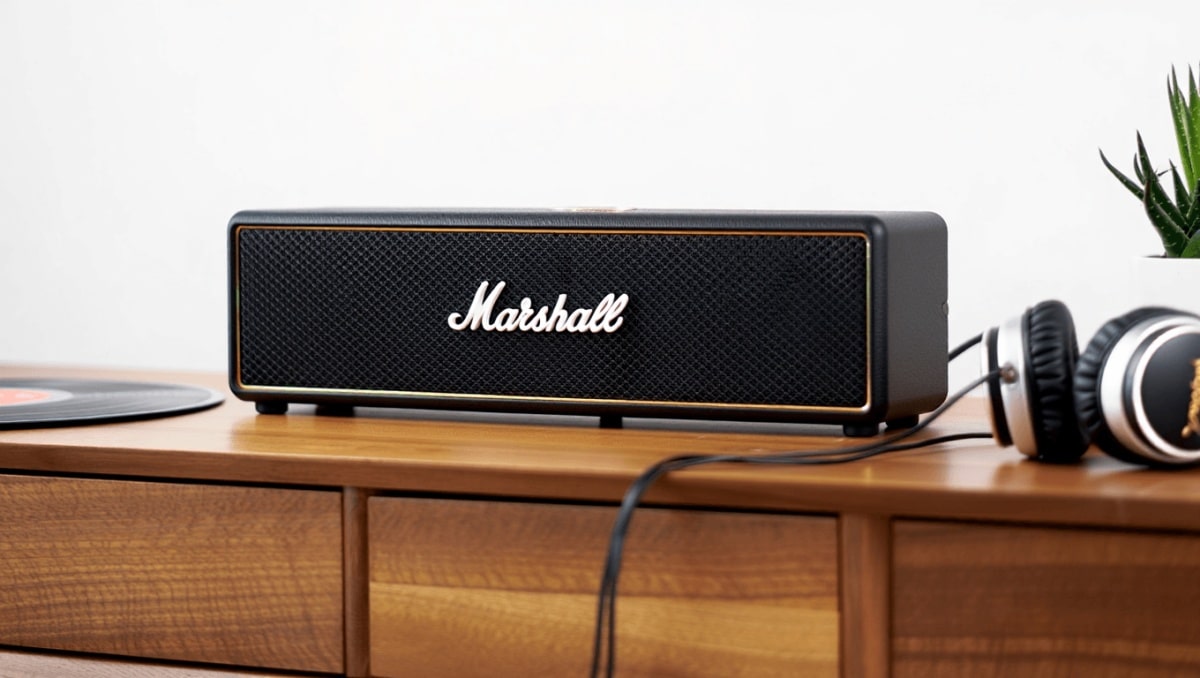
Marshall’s Heston 60 arrives looking like a vintage amp and sounds bigger than its size implies. It’s a compact soundbar that makes a visual statement and punches well above its class. For small rooms it’s an obvious pick, and with an added subwoofer it can fill much larger spaces.
Design that stands out in any living room
The Heston 60 borrows Marshall’s signature amp styling but in a subtler package than its larger sibling. You get the faux-leather cabinet, the classic script logo, and a textured fabric grille. The top-mounted controls are nearly flush, finished in a brass tone.
80s British indie bands that changed American alternative rock forever
Pearl Jam drummer quits after 27 years: band says where things stand
- Two color choices: Black or cream.
- Compact footprint: About 2.7 inches tall, easy to fit under most TVs.
- Wall-friendly features: Magnetic logo and control panel, wall-mount grommets, and a removable rear cable guide for a tidy install.
The controls face forward when wall-mounted, which explains the decision to avoid protruding knobs. That keeps the look clean. The Marshall app can dim the control LEDs, which is handy if the bar sits at eye level.
Hookup and initial setup
Getting basic TV audio up and running is simple. Plug the Heston 60 into your TV via HDMI-ARC/eARC, connect power, and use your TV remote for volume.
To unlock streaming services and room correction, you’ll need the Marshall Wi‑Fi app. The app handles Wi‑Fi setup, software updates, and a brief room calibration routine that takes a couple of minutes. The app also controls source selection and sound modes.
Note: The Heston ships without a dedicated remote. Expect to use the app or your TV remote for most adjustments.
Connections and practical controls
The Heston 60 covers modern wireless formats and a few useful legacy ports.
- HDMI-eARC: For TV audio and passthrough.
- 3.5mm analog input: A rare plus that lets you connect turntables or any analog source.
- Sub-out (RCA): Use Marshall’s wireless Sub 200 or any powered sub with RCA input.
- USB-C: Present on the bar, but its exact role is unclear without HDMI inputs to power stick-style streamers.
Wireless support includes Wi‑Fi 6, Apple AirPlay 2, Google Cast, Spotify Connect, Tidal Connect, and UPnP. Bluetooth 5.3 supports SBC, AAC, and LC3.
The top-panel buttons cover source, play/pause, skip, volume, and sound modes. One button is labeled “Prog.” but acts as a single programmable preset trigger inside the Marshall app.
How it performs for movies and TV
Marshall built seven amplified drivers into the Heston 60: five full-range units and two dedicated woofers. That hardware gives the bar more physical drivers than many rivals in its size class.
Low-end impact is a real strength. Even without the optional wireless sub, the Heston 60 delivers surprising punch. When paired with the Heston Sub 200, bass becomes authoritative for its size.
That said, the Heston isn’t flawless for cinematic clarity. In busy scenes, vocals can get a little masked by other soundtrack elements. Dialogue in quiet scenes remains clear, but layered action or dense backgrounds sometimes muddle speech.
Dolby Atmos content is supported but virtualized. The Heston lacks dedicated height drivers, so height effects are limited compared with larger or dedicated Atmos systems. Still, it creates a broad soundstage and projects a cinematic sense of scale.
What to expect in typical viewing
- Strong bass for explosions and engines.
- Wide soundstage that improves immersion.
- Virtualized height effects — present but not dramatic.
- Dialogue may need the Voice mode to stand out in loud scenes.
Music listening: lively and musical
The Heston 60 is also at home with music. Its dual woofers add warmth and presence across genres. In Music mode it sounds lively and can scale up well at louder volumes.
Formats and streaming: The Heston handles ALAC, FLAC, LPCM, MPEG-4, Ogg Vorbis, and WMA variants. Tidal Connect, Spotify Connect, AirPlay, Google Cast, and Bluetooth provide flexible playback options.
Streaming quirks do exist. For example, some combinations — like Amazon Music casting from an iPhone — showed reduced volume in my testing. Direct streaming paths such as Tidal Connect and AirPlay were generally more reliable.
Dolby Atmos Music plays, but the effect is modest. On the Heston 60, some Atmos mixes can sound brighter and a touch more sibilant than stereo.
EQ, room correction, and sound modes
The onboard room calibration is quick and useful in some layouts, but it won’t completely transform a problematic room. Results vary by space and furnishings.
- Sound modes: Music, Movie, Night, and Voice.
- Custom EQ: Adjust and save EQ curves for each mode via the app.
- Calibration: Repeatable or disableable if you prefer manual EQ.
If dialogue is soft, the Voice mode raises speech clarity. But boosting Voice too much can thin out bass and remove cinematic weight.
Comparisons and value
Priced at around $699, the Heston 60 sits above rivals like the Sonos Beam Gen 2 and Bose Smart Soundbar. Those competitors often cost $100–$200 less.
Why pay the premium? Marshall’s case centers on distinct industrial design, stronger bass from built-in woofers, an analog input, and the flexible sub-out. If those matter to you, the Heston rewards the choice.
However, if you prioritize dialogue clarity, native multiroom ecosystems, or the most convincing Atmos virtualization, Sonos and Bose may have the edge.
Key specifications and what’s in the box
- Dimensions: 28.74 x 2.68 x 4.88 inches.
- Weight: ~6 pounds.
- Drivers: 7 total — 5 full-range, 2 woofers.
- Amps: 7 Class D amps (2 x 25 W, 5 x 5 W).
- Channels/config: 5.1 virtual processing.
- Ports: HDMI-eARC, 3.5mm AUX, sub-out (RCA), USB-C.
- Networking: Wi‑Fi 6, Bluetooth 5.3.
- Streaming: AirPlay 2, Google Cast, Spotify Connect, Tidal Connect, UPnP.
- Audio codecs: AAC, MPEG‑4, ALAC, FLAC, LPCM, Ogg Vorbis, WMA, WMA9.
- Supported formats: Dolby Atmos, Dolby Digital, DTS‑X.
- Included: Soundbar, HDMI cable, power cable, quick-start guide, wall-mount grommets.










